Short answer: sometimes. The longer answer depends on your home, your problem, and what you're expecting. This guide helps you figure out which side of that line you're on — before you buy anything.
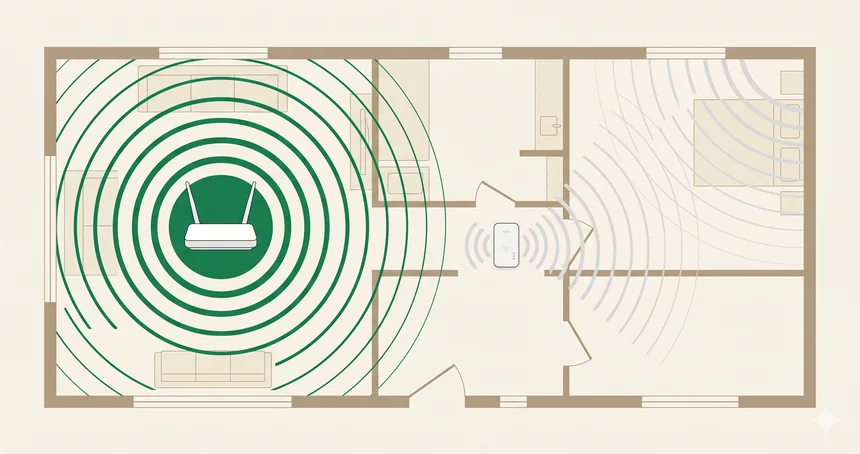
Wi-Fi extenders are worth it when you have one specific dead zone in a smaller home — a back bedroom, a garage, a home office at the far end of the house. They're a cheap, effective fix for that exact problem. They're not worth it if you need whole-home coverage across multiple floors or rooms, because the speed penalty and separate network frustration adds up fast. In that case, a mesh system is the better call.
Picture a game of telephone. Your router whispers something to the extender. The extender repeats it — hopefully accurately — to your device in the far bedroom. That's essentially how a Wi-Fi extender works: it receives your router's signal and rebroadcasts it.
Simple. And that simplicity is both the appeal and the problem.
Most extenders use the same radio to receive and retransmit data simultaneously. Which means they're constantly doing two things at once on the same channel — and the available bandwidth gets cut roughly in half as a result. You might get 200 Mbps from your router and only 90–100 Mbps at the extender's location, even in ideal conditions.
Dual-band extenders are smarter: they dedicate one frequency band (usually 5 GHz) to communicate with the router and the other (2.4 GHz) for your devices. This reduces the speed penalty significantly, though it doesn't eliminate it entirely.
Most extenders create a separate Wi-Fi network name — something like HomeWiFi_EXT. Your devices won't automatically switch to it. You have to manually connect, which is fine in a static setup but quietly irritating if you move between rooms expecting seamless coverage. Mesh systems solve this; standard extenders don't.
They're all the same thing. "Wi-Fi extender," "Wi-Fi booster," and "Wi-Fi repeater" are different names for the same category of device. Marketing teams just disagree on terminology. If it plugs into a wall socket and extends your existing signal, it's an extender.
Let's be honest about when these things actually earn their keep. The use case where an extender shines is specific, but it's also very common.
That last point about thick walls is often overlooked. Extenders push a wireless signal through whatever is in the way — and concrete, brick, and metal reduce it significantly. If a thick wall is causing your dead zone, an extender halfway between the router and the problem room may still struggle to maintain a usable signal. A mesh system with a node on each side of the wall (or a wired access point) works far better in those cases.
Before buying anything: run a speed test near your router, then in the dead zone. If you're getting, say, 180 Mbps near the router and 4 Mbps in the bedroom, that's a real coverage problem worth solving. But also check — is the router just positioned poorly? Moving a router from a corner to a central location fixes more dead zones than any extender ever has.
Here's a scenario that plays out all the time: someone buys a $40 extender, plugs it in halfway down the hall, and discovers that speeds in the dead room improved from 3 Mbps to about 18 Mbps. Better. But the laptop won't automatically connect to the extender's network. The phone switches between networks randomly. Video calls drop when moving between rooms.
They buy a second extender for another floor. Now there are three networks. Devices connect to the wrong one. It becomes a mess.
That spiral — buying more extenders to cover more ground — almost always costs more in total than a two-node mesh system would have from the start, and still delivers a worse experience.
Two quality extenders at $60 each = $120, plus the headache of managing separate networks. An entry-level mesh kit (like TP-Link Deco or Eero) starts around $150–$180 for two nodes, delivers seamless roaming, and manages itself. If you're about to buy your second extender, stop and do that comparison first.
Think of it like a hallway relay race. The extender runs to your router, grabs the data, runs back to your device, hands it off. Then repeats. Even running fast, there's a built-in delay — and that overhead reduces throughput. It's not a flaw in the product; it's a physical consequence of the design.
In practice, you often end up with 40–50% of your full router speed in the extended zone. For casual browsing, that's probably fine. For 4K streaming, gaming, or large file transfers — that's where you notice it.
Both solve the same problem — getting WiFi to rooms your router can't reach. They just solve it differently, at different cost and complexity levels.
| Feature | Wi-Fi Extender | Mesh System |
|---|---|---|
| Price | $30–$100 | $150–$400 |
| Setup | Plug in, connect to Wi-Fi | App-guided, replaces router |
| Network name | Usually creates a 2nd SSID | One unified network |
| Roaming | Manual switch required | Seamless, automatic |
| Speed in extended zone | ~40–60% of router speed | Consistent, near-router speeds |
| Works with any router? | Yes | Replaces your router (usually) |
| Scalable? | Messy with multiple units | Add nodes easily |
| Best for | One dead zone, smaller homes | Whole-home, multi-floor coverage |
| Lifespan | 3–5 years before standards lag | 4–7 years with firmware updates |
Answer two questions for a tailored recommendation.
Describe your situation and we'll give you a straight answer